My Pre-Paid153
Publisher Description
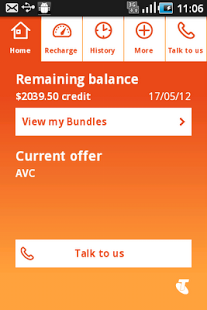
My Pre-Paid is the smart way to manage your Telstra Pre-Paid service on your Android powered smartphone.
To get started, simply download the My Pre-Paid application to your handset (normal download charges apply) and you’re ready to:
• check your balance and credit expiry
• view your bonuses
• recharge with a Credit Card or voucher
• change your Offer
• purchase Plus Packs
• view 180 Days of Usage and recharge history
• If you need help, simply tap the app’s “Talk to us” icon to call Telstra directly.
My Pre-Paid is unmetered, so once you’ve downloaded it, it’s free to use in Australia.
My Pre-Paid has been designed specifically for the following Android™ powered phones with more coming soon:
• HTC Desire C
• HTC Wildfire
• HTC Wildfire S
• Huawei Ascend Y201
• LG Optimus L3
• LG Optimus Spirit
• Samsung Galaxy Ace
• Samsung Galaxy Ace Plus
• Samsung Galaxy Y
• Telstra Active Touch
• Telstra Frontier
• Telstra Smart Touch
• Telstra Smart Touch 2
• Telstra Urbane
To avoid potential mobile data charges for downloading this application from Google Play™, we recommend that you download My Pre-Paid while connected via Wi-Fi.
Additional information on the My Pre-Paid app:
• The app is only supported on specific mobile phones
• Telstra provides the app on the terms and conditions http://www.telstra.com.au/customer-terms/
Android and Google Play are trademarks of Google, Inc.
About My Pre-Paid
The company that develops My Pre-Paid is Telstra Corporation Ltd.. The latest version released by its developer is 153. This app was rated by 1 users of our site and has an average rating of 3.0.
To install My Pre-Paid on your Android device, just click the green Continue To App button above to start the installation process. The app is listed on our website since 2012-11-27 and was downloaded 11 times. We have already checked if the download link is safe, however for your own protection we recommend that you scan the downloaded app with your antivirus. Your antivirus may detect the My Pre-Paid as malware as malware if the download link to com.telstra.products.tscc is broken.
How to install My Pre-Paid on your Android device:
- Click on the Continue To App button on our website. This will redirect you to Google Play.
- Once the My Pre-Paid is shown in the Google Play listing of your Android device, you can start its download and installation. Tap on the Install button located below the search bar and to the right of the app icon.
- A pop-up window with the permissions required by My Pre-Paid will be shown. Click on Accept to continue the process.
- My Pre-Paid will be downloaded onto your device, displaying a progress. Once the download completes, the installation will start and you'll get a notification after the installation is finished.
Program Details
System requirements
Download information
Pricing
Version History
version 153
posted on 2012-11-27
version 153
posted on 2012-11-27
Several fixes and updates
